
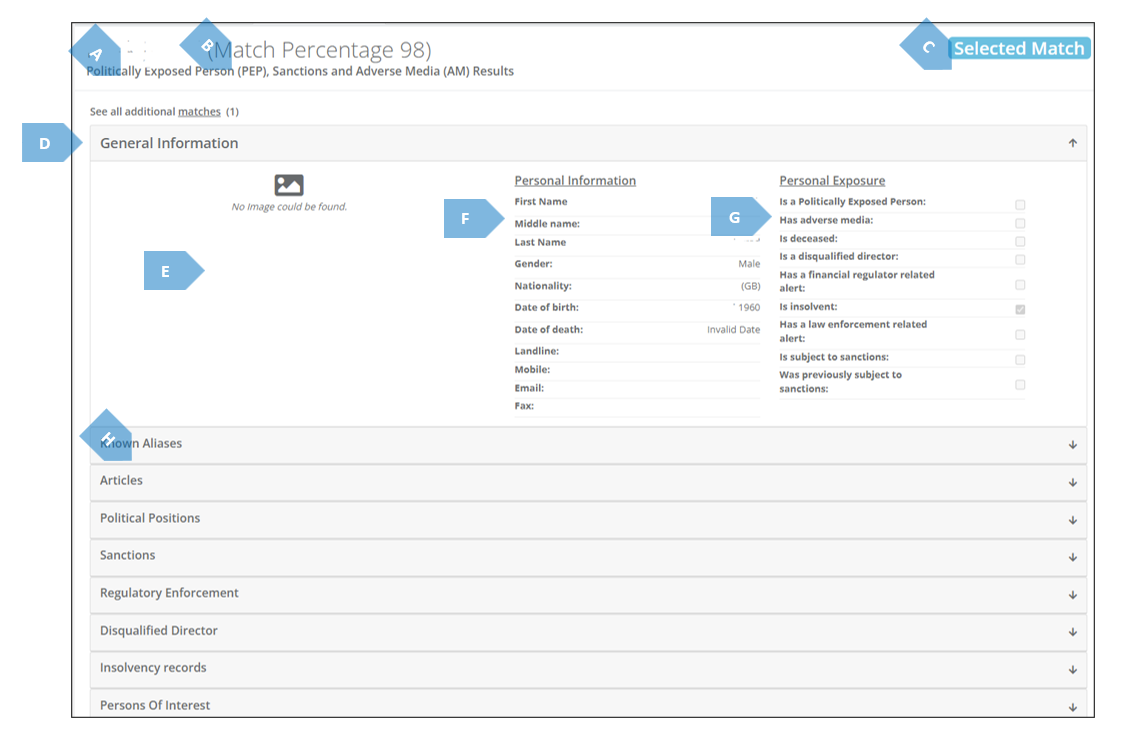
In the screengrab and table below you can find an overview of the data presented in this tab.
|
|
Element |
Explanation |
|
A |
Entity Name |
Here appears the name of the entity you checked. |
|
B |
Match Percentage |
When searching data about one entity one can, in fact, receive also data about another entity. The “Match Percntage” is the Platform’s determination as to what is the probability that the data presented in this tab, actually refers to the entity in question. |
|
C |
Selected Match |
Indicates that there are other possible matches for this entity. Meaning, there might be PEP, Sanction and Adverse Media data about the entity under investigation, which appear under a different name associated with the entity. |
|
D |
See all additional matches |
If you press the word “matches”, the Platform will take you to the bottom of the screen, where you will be able to see the other entities that have PEP, Sanctions and AM about them, that might be the entity in question. 
After pressing “Preview”, the screen will again go up to the PEP, Sancions and Adverse Media Matches tab, this time showing you the “Match Preview”. Here you can browse the possible other match, and, afterwards, return to the selected match by pressing “Return to selected match”. 
|
|
E |
Image |
Here the person’s image will appear, if available. |
|
F |
Personal Information |
Here the person’s personal information will appear. |
|
G |
Personal Exposure |
Here will appear if there are findings about the person, by category. |
|
H |
Other Fields |
Here will appear all the other information fields about the person. Expand the accordion tabs in order to access the data contained in them. In some tabs, like the “Articles” tab, you will find links to the “raw data” the determination is based upon. |