
As explained in Section 1.4.2.3 above, the platform’s CRA module, mRX™, automatically and instantly comprises a risk assessment of the client, based on the data gathered by the two other modules (or by only one of them, if your firm utilises only one of the modules).
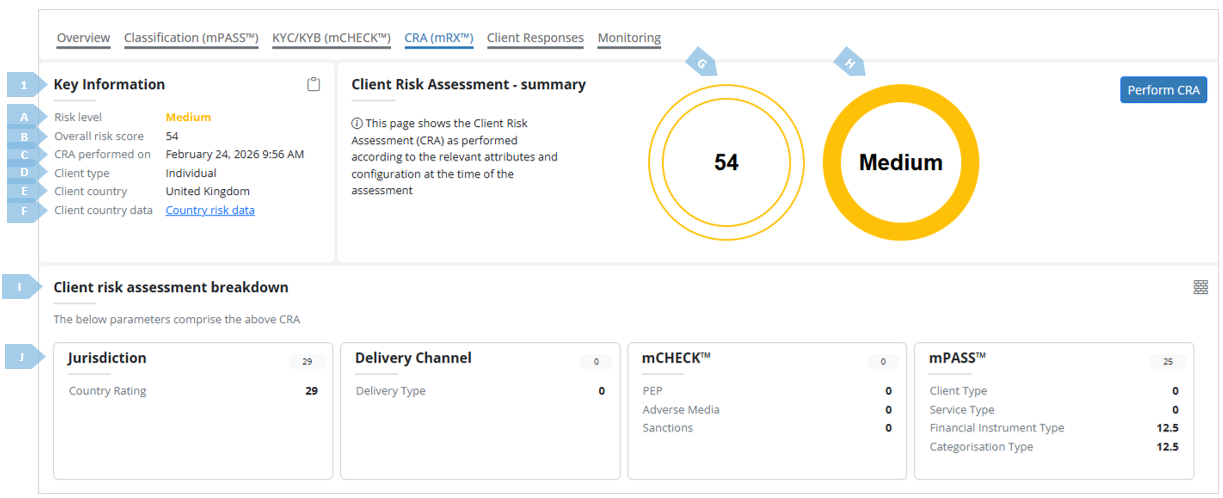
A deeper dive into the mRX™ module can be found in the said Section of this manual, as well as in Section 9. This Section here focuses on the assessment reports, and how to read them. Below you will find a screengrab of the CRA (mRX™) tab, and a short explanation of the main elements appearing in it.
|
|
Element |
Description |
|
A |
Risk level |
The risk level assigned by the module on the basis of platform configurations and specific findings in the case. |
|
B |
Overall risk score |
The overall score the module has assigned, on the basis of platform configurations and specific findings in the case. |
|
C |
CRA performed on |
CRA timestamp |
|
D |
Client type |
Corporate or individual |
|
E |
Client country |
The client’s jurisdiction of incorporation (for a corporate client) or residence (for an individual client), as provided in the journey. |
|
F |
Client country data |
Link jurisdictional risk data pertaining the client country. |
|
|
|
|
|
G |
Overall risk score wheel |
Visualisation of the overall risk score. |
|
H |
Risk level wheel |
Visualisation of the risk level. |
|
I |
Client risk assessment breakdown tile |
This section specifies the risk parameters (factors and sub-factors) which played a part in this specific CRA, and the scores each of those has received. |
|
J |
Risk parameter cards |
This section contains cards which lay out the risk parameters that were in play in the specific assessment. Each card details a certain risk area, and shows the risk factors relevant to that area. For example, the mPASS™ “card” details Client type, service type, financial instrument type and categorisation type. The added risk per each of those factors appears to their right (0,0,12.5,12.5), and the overall risk “contribution” of the entire card (25) appears at the top right corner of the card. |
The mRX™ module, being a risk assessment tool, factors in parameters your firm deems essential for the evaluation of the risk a relationship with the said client poses.
The CRA (mRX™) report helps you decide whether or not it is in your firm’s best interests to onboard the client, and take other decisions on that basis – for example, put the client on enhanced monitoring, practice care in contacts with them, etc.