
The first tab to the left is the “RAG Results” tab. This is, in effect, an overview of the mCHECK™ part of the assessment.
The RAG result (Red/Amber/Green) gives a numeric value to each find, and is determined according to three factors:
a. pre-configured scores to possible findings;
b. pre-configured thresholds, which define what score-range is “Green”, what score-range is “Amber”, and what score-range is “Red”; and
c. of course, the findings themselves.
Below is an example of the RAG Results of a fictitious check of the fictional corporate “Manual Muinmos Aps ”. Let’s first have a look at the overall score, appearing in the upper left corner of the tab.
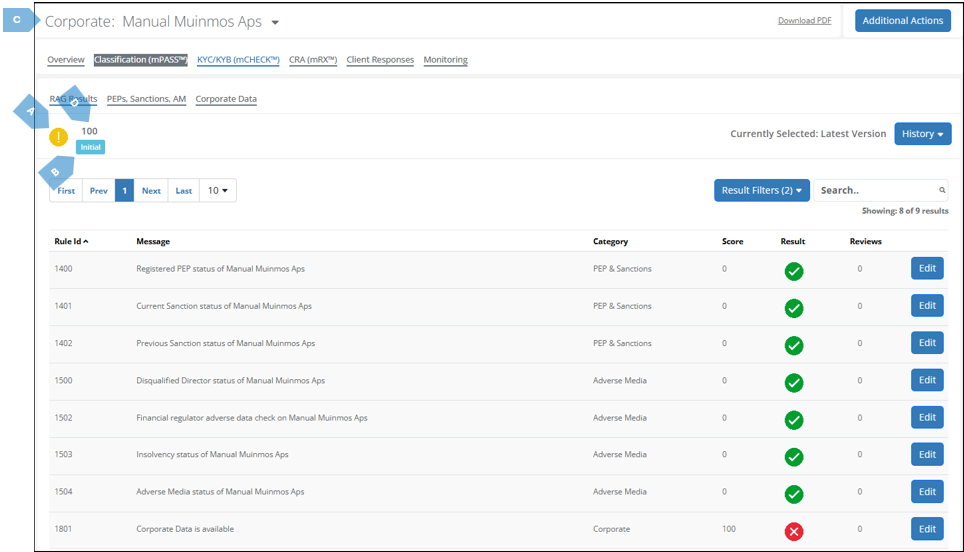
Let’s break-down the main elements in the upper left corner:
|
|
Element |
Function |
|
|
A |
RAG Result |
Indicates the RAG (Red / Amber / Green) score of the assessment. As previously explained, this is determined according to a pre-configured scoring system, which gives a numeric value to each find; pre-configured thresholds, which determine what score-range is designated “Green”, what score-range is designated “Amber”, and what score-range is designated “Red”; and, of course, the findings themselves. In the example above, a score of 100 yielded the RAG “Amber”. However, theoretically, a higher score (which is, in principle, worse than a lower score, as it indicates more issues) can yield a “Green” RAG – if the “Amber” threshold were to be set, for example, on 200. Note also that the same findings can bring about a different score – if the done under different scoring matrix. |
|
|
B |
Result Type |
Indicates if the report is the outcome of: |
|
|
|
|

|
the initial, original assessment; |
|
|
|

|
a re-run of the assessment; |
|
|
|

|
a manual override performed by a user of the Platform. Refer to section 4.6.4.2.3 for more information on this. |
|
|
|

|
accepting/rejecting a match from Initial Results |
|
|
|
It the report has previous iterations, pressing the plus sign on the left will open a screen similar to the following, showing you the previous iterations: 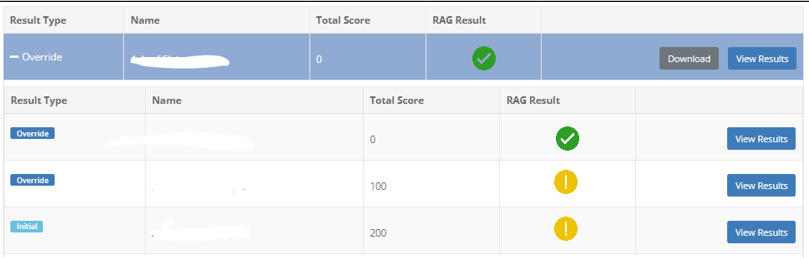
Pressing the “View Results” button on the right, will revert the report to its version prior to the change. |
|
|
C |
Total Score |
The total score the client received in their mCHECK™ assessment. The higher the score, the more negative findings were discovered by the Platform (of course, this score also depends on the weight given to each individual parameter). |
|
|
D |
Name |
The name of the assessed client. |
|