
Data encryption is imperative.
The encryption key for your Platform is created automatically by Microsoft Azure’s Key Vault, so you do not need to do anything in that respect. However, the Platform does allow you to control certain aspects of the encryption process, as we’ll see below.
First, how to get to the relevant screen:
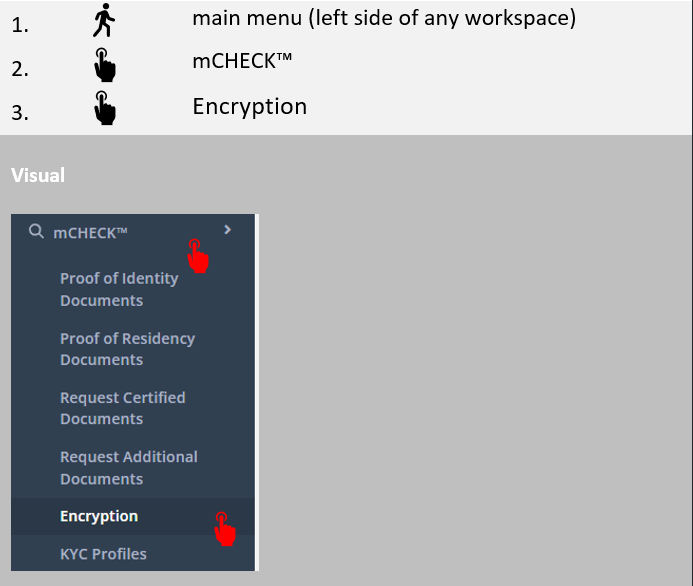
The below screen will open:
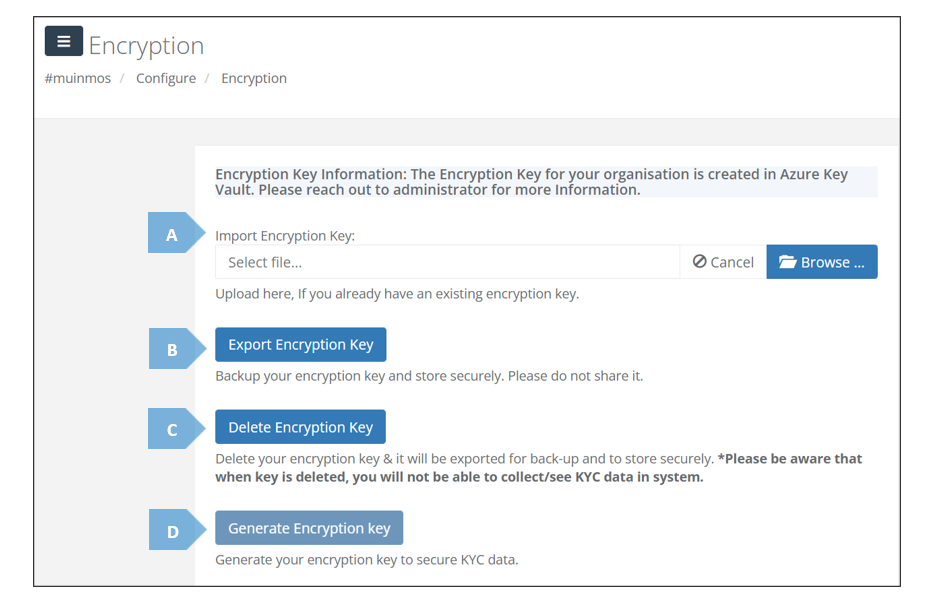
Here’s a breakdown of the different elements the screen contains:
|
|
Element |
Explanation |
|
A |
Import Encryption Key |
Allows you to upload an existing encryption key, is such key had been previously created. |
|
B |
Export Encryption Key |
Allows you to download your data’s encryption key, for the purpose of backup. You are strongly advised to keep it secure, and not to share it with anyone. |
|
C |
Delete Encryption Key |
Allows you to delete your encryption key. |
|
D |
Generate Encryption Key |
After an encryption key is deleted, this button will allow you to generate a new one. |